How to create and update API keys for callflows and predial context
Last updated: June 24, 2025
In your daily operations, you might find yourself needing to create or update API keys for access to our by-callflows / predial-context APIs. This guide will provide step-by-step instructions for performing these tasks.
Creating a new API key
Follow these steps to create a new API key:
Log in to your account on our platform.
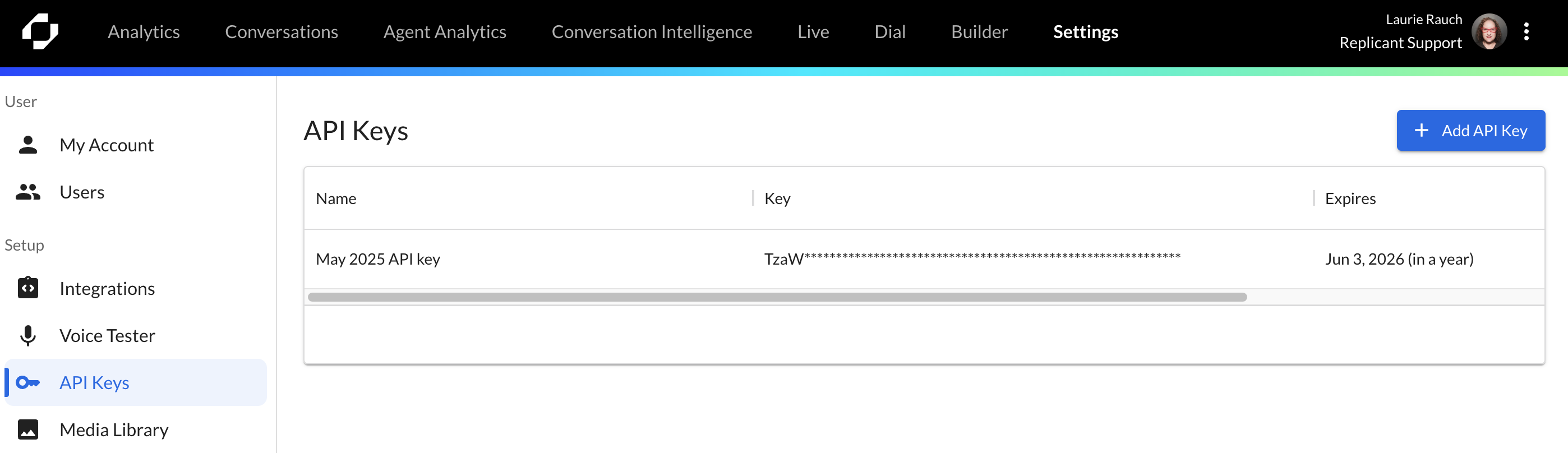
In the top menu, select Settings.
On the left-hand side menu, click API Keys.
Click + Add API Key.
In the dialog, enter a descriptive name for the key. It's recommended to use the name of the callflow software and a date for easy identification such as MyAwesomeCallflowSoftware - 2025.
Examples:Amazon Connect - 2023
Genesis - 2023/204
Five9 - 2023
Choose an expiration time for the new key. We recommend setting this to 12 months.
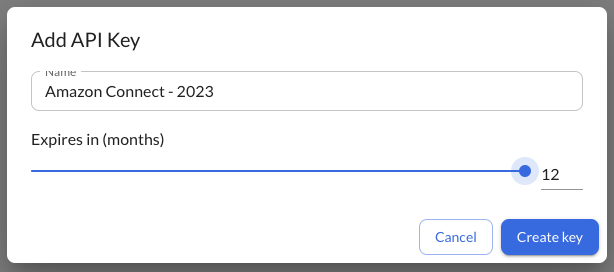
Click Create Key.
The newly created key will be displayed in a new dialog.
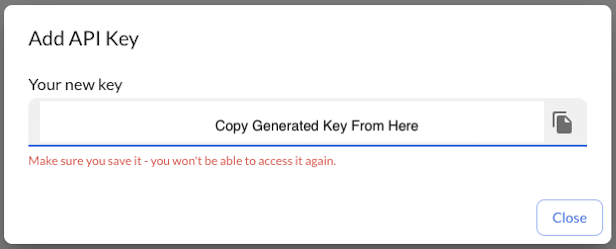
Important: This key will only be visible once, so make sure to capture it.
Updating your callflow software with the new API key
After creating a new API key, you'll need to update your callflow software with it. The process for doing this will depend on your specific software. Generally, you'll need to find the appropriate location within the software's settings and enter the new key there. You may need to reach out to your IT or Telephony team for assistance with this step.
Deleting the old API key
Once you've verified that the new key is being used, it's important to delete the old key from the Replicant Dashboard. You can do this by clicking on the trash can icon next to the old key.

Remember, managing your API keys effectively is crucial to maintaining secure and efficient access to our by-callflows and predial context. If you encounter any issues while following this guide, don't hesitate to reach out to our support team.